1. URL 링크
타임리프에서 URL을 생성할 대는 @{...} 문법을 사용
BasicController
 @GetMapping("/link")
 public String link(Model model) {
    model.addAttribute("param1", "data1");
    model.addAttribute("param2", "data2");
 return "basic/link";
 }
basic/link.html
<!DOCTYPE html>
<html xmlns:th="http://www.thymeleaf.org">
<head>
<meta charset="UTF-8">
<title>Title</title>
</head>
<body>
<h1>URL 링크</h1>
<ul>
<li><a th:href="@{/hello}">basic url</a></li>
<!--hello?param1=data1¶m2=data2-->
<li><a th:href="@{/hello(param1=${param1}, param2=${param2})}">hello query
param</a></li>
<!--hello/data1/data2-->
<li><a th:href="@{/hello/{param1}/{param2}(param1=${param1}, param2=${param2})}">path variable</a></li>
<!--/hello/data1?param2=data2-->
<li><a th:href="@{/hello/{param1}(param1=${param1}, param2=${param2})}">path variable + query parameter</a></li>
</ul>
</body>
</html>
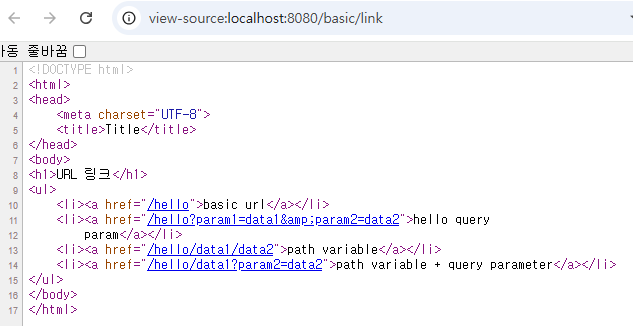
1. 단순 URL
- @{/hello} -> /hello
2. 쿼리 파라미터
- @{/hello(param1=${param1},param2=${param2})} -> /hello?param1=data1¶m2=data2
- ()에 있는 부분은 쿼리 파라미터로 처리함
3. 경로 변수
- @{/hello/{param1}/{param2}(param1=${param1}, param2=${param2})} -> /hello/data1/data2
- URL 경로 상에 변수가 있으면 ()부분은 경로 변수로 처리됨
4. 경로 변수 + 쿼리 파라미터
- @{/hello/{param1}(param1=${param1}, param2=${param2})} -> /hello/data1?param2=data2
- 경로 변수와 쿼리 파라미터를 함께 사용할 수 있음
상대경로, 절대경로, 프로토콜 기준으로 표현 가능
절대경로: /hello
상대경로: hello
실행결과 html 소스코드 보기
2. Literals
리터럴은 소스 코드 상에 고정된 값을 말함
ex) Hello는 문자 리터럴, 10,20은 숫자 리터럴
타임리프의 리터럴
- 문자: 'hello'
- 숫자: 10
- 불린: true, false
- null: null
타임리프에서 문자 리터럴은 항상 ''(작은 따옴표)로 감싸야 함
<span th:text=" 'hello' ">
하지만, 문자를 항상 작은 따옴표로 감싸는 건 너무너무너무 귀찮
그래서 공백 없이 쭉 이어지면 하나의 의미있는 토큰으로 인지해서 다음과 같이 작은 따옴표를 생략할 수 있음
<span th:text="hello"> = 문제 없음
<span th:text="hello world"></span> = 문제 발생
-> 문자 리터럴은 원칙상 작은 따옴표로 감싸야 함. 중간에 공백이 있어서 하나의 의미있는 토큰으로 인식되지 않음
-> 따라서 " 'hello world!' "이렇게 작은 따옴표로 감싸야 함
BasicController
@GetMapping("/literal")
public String literal(Model model){
    model.addAttribute("data", "Spring!");
    return "/basic/literal";
}
basic/literal.html
<!DOCTYPE html>
<html xmlns:th="http://www.thymeleaf.org">
<head>
    <meta charset="UTF-8">
    <title>Title</title>
</head>
<body>
<h1>리터럴</h1>
<ul>
    <!--    <li>"hello world!" = <span th:text="hello world!"></span></li>-->
    <li>'hello' + ' world!' = <span th:text="'hello' + ' world!'"></span></li>
    <li>'hello world!' = <span th:text="'hello world!'"></span></li>
    <li>'hello ' + ${data} = <span th:text="'hello ' + ${data}"></span></li>
    <li>리터럴 대체 |hello ${data}| = <span th:text="|hello ${data}|"></span></li>
</ul>
</body>
</html>
리터럴 대체 (Literal substitutions)
마지막의 리터럴 대체 문법을 사용하면 템플릿을 사용하는 것처럼 편리함
|hello ${data}| : 이런 식으로 대체 가능
3. 연산
타임리프 연산은 자바와 크게 다르지 않음. HTML 안에서 사용하기 때문에 HTML 엔티티를 사용하는 부분만 주의하면 됨
BasciController
@GetMapping("/operation")
public String operation(Model model){
    model.addAttribute("nullData", null);
    model.addAttribute("data", "Spring!");
    return "/basic/operation";
}
basic/operation.html
<!DOCTYPE html>
<html xmlns:th="http://www.thymeleaf.org">
<head>
<meta charset="UTF-8">
<title>Title</title>
</head>
<body>
<ul>
<li>산술 연산
<ul>
<li>10 + 2 = <span th:text="10 + 2"></span></li>
<li>10 % 2 == 0 = <span th:text="10 % 2 == 0"></span></li>
</ul>
</li>
<li>비교 연산
<ul>
<li>1 > 10 = <span th:text="1 > 10"></span></li>
<li>1 gt 10 = <span th:text="1 gt 10"></span></li>
<li>1 >= 10 = <span th:text="1 >= 10"></span></li>
<li>1 ge 10 = <span th:text="1 ge 10"></span></li>
<li>1 == 10 = <span th:text="1 == 10"></span></li>
<li>1 != 10 = <span th:text="1 != 10"></span></li>
</ul>
</li>
<li>조건식
<ul>
<li>(10 % 2 == 0)? '짝수':'홀수' = <span th:text="(10 % 2 == 0)? '짝수':'홀수'"></span></li>
</ul>
</li>
<li>Elvis 연산자
<ul>
<li>${data}?: '데이터가 없습니다.' = <span th:text="${data}?: '데이터가 없습니다.'"></span></li>
<li>${nullData}?: '데이터가 없습니다.' = <span th:text="${nullData}?: '데이터가 없습니다.'"></span></li>
</ul>
</li>
<li>No-Operation
<ul>
<li>${data}?: _ = <span th:text="${data}?: _">데이터가 없습니다.</span></li>
<li>${nullData}?: _ = <span th:text="${nullData}?: _">데이터가 없습니다.</span></li>
</ul>
</li>
</ul>
</body>
</html>
- 비교 연산: HTML 엔티티를 사용해야 하는 부분 주의
- >(gt), <(lt), >=(ge),<=(le), !(not), ==(eq), !=(neq, ne)
- 조건식: 자바의 조건식과 유사
- Elvis 연산자: 조건식의 편의 버전
- No-Opertaion: _인 경우 마치 타임리프가 실행되지 않는 것처럼 동작. 이를 잘 사용하면 HTML의 내용을 그대로 활용할 수 있음. 마지막의 예를 보면 데이터가 없습니다. 부분이 그대로 출력됨
실행 결과

4. 속성 값 설정
타임리프 태그 속성(Attribute)
타임리프는 주로 HTML 태그에 th:* 속성을 지정하는 방식으로 동작
th:*로 속성을 적용하면 기존 속성을 대체함. 기존 속성이 없으면 새로 생성
Controller
@GetMapping("/attribute")
public String attribute(){
    return "basic/attribute";
}
basic/attribute.html
<!DOCTYPE html>
<html xmlns:th="http://www.thymeleaf.org">
<head>
    <meta charset="UTF-8">
    <title>Title</title>
</head>
<body>
<h1>속성 설정</h1>
<input type="text" name="mock" th:name="userA" />

<h1>속성 추가</h1>
- th:attrappend = <input type="text" class="text" th:attrappend="class=' large'" /><br/>
- th:attrprepend = <input type="text" class="text" th:attrprepend="class='large '" /><br/>
- th:classappend = <input type="text" class="text" th:classappend="large" /><br/>

<h1>checked 처리</h1>
- checked o <input type="checkbox" name="active" th:checked="true" /><br/>
- checked x <input type="checkbox" name="active" th:checked="false" /><br/>
- checked=false <input type="checkbox" name="active" checked="false" /><br/>
</body>
</html>
속성 설정
th:* 속성을 지정하면 타임리프는 기존 속성을 th:*로 지정한 속성으로 대체함. 기존 속성이 없으면 새로 만듦
<input type="text" name="mock" th:name="userA" />
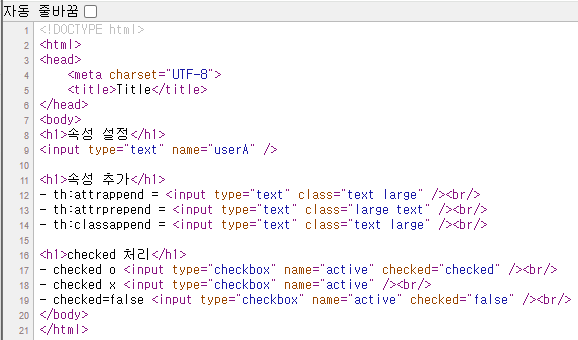
-> 타임리프 렌더링 후 <input type="text" name="userA" />로 바뀜
속성 추가
th:attrappend: 속성 값의 뒤에 값을 추가
th:attrprepend: 속성 값의 앞에 값을 추가
th:classappend: class 속성에 자연스럽게 추가
checked 처리
HTML에서는 <input type="checkbox" name="active" checked="false" /> 이 경우에도 checked 속성이 있기때문에 checked 처리가 되어버림
HTML에서 checked 속성은 checked 속성의 값과 상관없이 checked라는 속성만 있어도 체크가 됨. 이런 부분이 true, false 값을 주로 사용하는 개발자 입장에서 불편함
타임리프의 th:checked는 값이 false인 경우 checked 속성 자체를 제거함
<input type="checkbox" name="active" th:checked="false" />
-> 타임리프 렌더링 후: <input type="checkbox"name="active" />
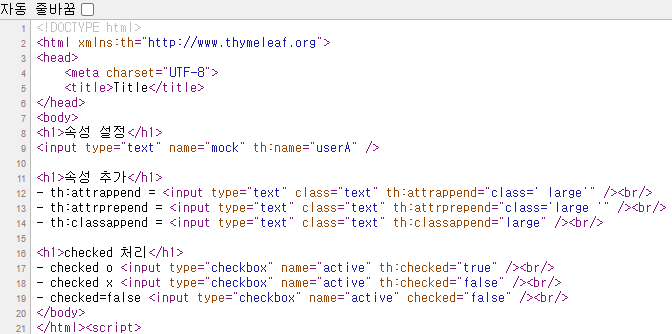
실행결과
'SpringMVC > [스프링MVC 2편] 백엔드 웹 개발 활용 기술' 카테고리의 다른 글
| [Thymeleaf 스프링 통합] 타임리프 스프링 통합 (0) | 2025.09.25 |
|---|---|
| [Thymeleaf 기본 기능] 템플릿 조각과 레이아웃 (0) | 2025.09.25 |
| [Thymeleaf 기본 기능] 자바스크립트 인라인 (0) | 2025.09.25 |
| [Thymeleaf 기본 기능] 반복, 조건부 평가, 주석, 블록 (0) | 2025.09.24 |
| [Thymeleaf 기본 기능] 소개 및 텍스트, SpringEL, 객체, 유틸리티 객체 및 날짜 (0) | 2025.09.24 |